


Verdict: a Canva Brand Kit is enough if you already have a logo, colors and fonts and just want them applied consistently in Canva. If you have no name, logo or palette you trust yet, make the brand first and load it into Canva afterwards. A Brand Kit stores and applies a brand. It does not create one.
Canva's help page describes it as a way to "upload and organize your team or organization's official logos, colors, fonts, and assets in one place." It does not choose your business name, draw your logo, pick your palette or write your voice. We did not test Canva hands-on. Every Canva fact below comes from Canva's own pages, read on 2026-11-17, and we name the page. We make Monstric, an AI branding studio, so we have a view on the "make the brand first" half.
What a Canva Brand Kit holds
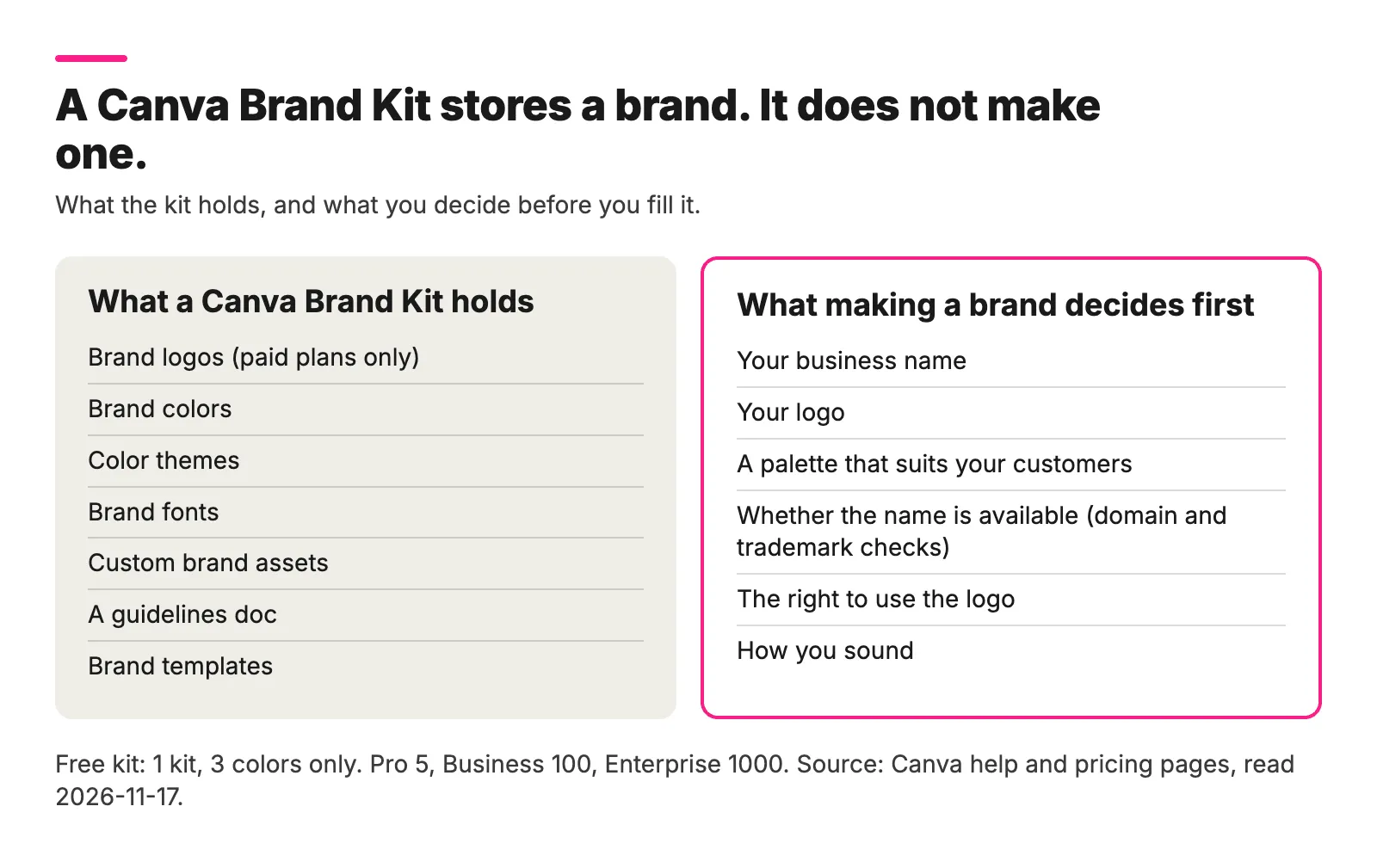
Canva's "Set up Brand Kits" help page says each kit includes assets and guidelines: brand logos, brand colors, color themes ("define how colors work together across backgrounds, elements, and text"), brand fonts and custom brand assets. It also has a Guidelines section that sends you to a doc you fill in, and a Brand Templates section in every kit except personal ones. Team members can use anything in the kit; to restrict them to the kit's colors and fonts, you set up Brand Controls. For one founder making their own posts, that matters little. The glossary entry for brand kit and our guide on what is in a brand kit separate the kit from brand guidelines.
How many kits each plan gets
Canva's pricing page lists Brand Kits per plan (read 2026-11-20):
- Free: "1 Brand Kit (maximum of 3 colors only)".
- Pro: "5 Brand Kits, components and on-brand AI".
- Business: "100 Brand Kits, components, approvals, and on-brand AI".
- Enterprise: "1000 Brand Kits, components, approvals, and on-brand AI".
We do not quote Canva prices. One mismatch: a preview on Canva's help center says "Brand Kits are available to users on Canva Pro, Teams, Business, Enterprise, Education, and Nonprofits," with no mention of Free. We saw only a preview line, so we cannot tell which page is more current. Open your own account to check.
"Free" also has a limit in practice. The pricing page says "maximum of 3 colors only", and Canva's "Upload and use brand logos" page said, when we read it on 2026-11-17, "Brand logos are only available to paid plans." On our reading, a Free kit holds a few colors but not an uploaded logo.
What Brand Kit Builder adds
Canva's help page says Brand Kit Builder "automatically creates a Brand Kit using content extracted from a website or PDF." It can add logos, colors, fonts, graphics, photography, brand voice and guidelines, depending on the source. Three limits, all from that page:
- It reads what exists. If your brand is not written down anywhere, there is nothing to extract.
- Canva says to "always review the extracted content and make any necessary changes."
- It lists Pro, Teams, Enterprise, Education and Nonprofit plans (Business is not named in that line) and a 200 MB file limit. For kits with minimal content, extracted elements may replace existing ones.
It turns "we have a brand somewhere" into "the brand is in Canva". It cannot invent one.
Choose Canva's kit alone if
- You already have a logo, two or three colors and a font or two.
- Most of your visuals (posts, flyers, menus, simple presentations) are made in Canva anyway.
- You are one person or a small team that needs everyone using the same files.
Then upload the logo (JPG, PNG or SVG; only logos you are licensed to use), add the hex codes and fonts, and write a few lines in the guidelines doc. Our brand guidelines template gives you a one-page set of words to paste in.
Make the brand first if
- You are still choosing between two names. Check availability before you build on one: see how to name a business and check availability and the free trademark search, a first-pass screening and not legal advice.
- Your logo is a placeholder or a template other businesses also use.
- You cannot say in one sentence who you are for and how you want to sound.
- You are unsure how many colors and fonts to use. Start with how many colors and fonts a brand should use.
The work is then upstream of Canva. Our guide to branding a new business from scratch lays out the order. For names, the business name generator gives 24 ideas per round and a live .com check, a lookup that registers nothing.
Monstric is one way to get a first version. You describe your business, and it suggests a name with a .com check, then a logo, colors and fonts. The free preview is one website header image per account, after signing in with Google or email. The paid brand kit download has the logo and an icon-only mark as PNG (light, dark, transparent) and SVG, favicons, colors as hex, RGB and CMYK, font names (not font files) and a one-page guide as an HTML file. Names are not guaranteed unique, available or trademark-clear. A freelancer or your own design work does the same job. See sample brands on the examples page.
Moving a finished brand into Canva
- Logo files. SVG for print and scaling, PNG for flexible use (Canva's best-practices preview text, preview only). Logos need a paid Canva plan.
- Hex codes for each color, kept in a note.
- Fonts. Upload fonts to the kit's fonts section. A font list gives names only, so you need the font files from wherever the font is licensed. We did not test how Monstric fonts behave inside Canva.
- A one-page guide pasted into the Guidelines doc. Brand Kit Builder may fill part of this from a PDF; review the result.
- A few templates: a post, a flyer and a card, added to Brand Templates.
Canva Brand Kit alternatives
A Brand Kit is one place to keep a brand. If you do not design in Canva, or you are on the Free plan and want your logo stored, there are other places. We read each product's own pages on 2026-11-26 and did not test any of them hands-on. We do not quote prices.
- A shared document and a folder. The simplest option, and it works with any tool: one page with your hex codes, font names and rules, next to a folder of logo and font files. It applies nothing automatically, so someone copies the codes into each tool. The brand guidelines template linked above is written for this.
- Adobe Express brand kits. Adobe's guide says you can "upload your logo, colors, fonts, graphics, and templates", with logos and graphics as JPEG, SVG, AI and more, and fonts as OTF or TTF files. You can start a brand from scratch or turn an existing Adobe library into one. Adobe's plans page lists "Brand kits to maintain consistency across your content" under Premium and adds brand controls and template locking under Teams. We saw no brand kit listed for the Free plan.
- Figma libraries. Figma's library guide does not use the term brand kit. The guide describes a library as "a collection of design assets, like components, styles, and variables" that other files can use, and its styles can hold colors and text settings. The page lists libraries for the Professional, Education, Organization, Government and Enterprise plans. It suits a team that designs a website or an app in Figma more than a founder making flyers.
- Monstric. We make Monstric, so weigh this one accordingly. It makes the brand instead of storing one you already have. The paid download is a folder, not a kit inside an editor: logo files as PNG and SVG, favicons, colors as hex, RGB and CMYK, font names and a one-page guide. You would still load those into Canva, Adobe Express or Figma to design with them.
Which one to pick? Keep the kit where you make most of your visuals. Keep the document and folder either way, because it is the copy that does not depend on any one subscription.
Decision checklist
- Do I have a name I have checked? If no, make the brand first.
- Do I have a logo file I am licensed to use? If no, make the brand first.
- Can I write my colors as hex codes and my fonts as names? If yes, build the kit.
- Do I need more than one kit, such as one per client? Check which plan allows it.
Need the brand before the kit?
Describe your business in one sentence and see a free preview of your brand on a website header. Sign in with Google or email to generate it.
Sources
- Canva, "Set up Brand Kits", https://www.canva.com/help/brand-kit/, read 2026-11-17.
- Canva, "Canva Pricing: Compare Free, Pro, Business and Enterprise plans", https://www.canva.com/pricing/, read 2026-11-17 and again 2026-11-20 (plan wording updated to the 20 Nov version).
- Canva, "Set up your Brand Kit automatically", https://www.canva.com/help/brand-kit-builder/, read 2026-11-17.
- Canva, "Upload and use brand logos", https://www.canva.com/help/brand-logos/, read 2026-11-17.
- Adobe Express blog, "Create a brand kit from scratch or from an existing library" (2023-08-15), https://www.adobe.com/express/learn/blog/brand-kits, read 2026-11-26.
- Adobe Express, plans and pricing page (plan features only; we do not quote prices), https://www.adobe.com/express/pricing, read 2026-11-26.
- Figma Help Center, "Guide to libraries in Figma", https://help.figma.com/hc/en-us/articles/360041051154-Guide-to-libraries-in-Figma, read 2026-11-26.
- Monstric brand kit download contents, checked in our code (brand export route) on 2026-11-26.
- Canva, "Brand Kit Best Practices Guide" (related-article preview text only; full page not opened), preview read 2026-11-17.