# Animated hero sections that don't wreck your page speed

Source: https://monstric.com/blog/animated-hero-section-examples
Author: Stan Vojtko, Founder of Monstric
Published: 2026-11-10
Description: Animated hero section examples with code: four looping MP4 heroes under 220 KB, poster images and LCP, muted autoplay, reduced motion and a pause button.

## Key takeaways

- A moving hero works, but a 6 MB background video or a GIF can wreck your Lighthouse score.
- The four loops on the Monstric homepage weigh 93 KB to 217 KB each, because the clips are short, small in pixels and the motion is contained.
- The poster is not decoration: Chrome counts the poster load or the first video frame, whichever comes first, toward Largest Contentful Paint.
- Paint the poster with the HTML, start the video after the load event, and skip it for reduced motion, Save-Data and 2G.

Every few weeks someone sends me a landing page with a moving hero and asks why their Lighthouse score fell off a cliff. Nine times out of ten the culprit is a 6 MB background video, or worse, a GIF. The tenth time it’s a hero that never paints until a JavaScript animation library wakes up.

Motion in a hero works. It’s the first thing the eye lands on, and a five second loop can say more about a product than three lines of copy. But it has a cost, and most of that cost is avoidable. Below are the four loops we use on the [Monstric homepage](https://monstric.com), what each file weighs, and the exact pattern we ship so the page still paints fast.

Quick note on the examples

Flamito, NaviGoose, ScrubRobin and Warmigos are concept brands Monstric generated as showcases. They aren’t live companies, so don’t go looking for them. The video files are real and are the same ones served on monstric.com.

## The four loops, and what they weigh

Each one is a 640 × 360 MP4, five seconds long, no audio track, with a WebP poster cut from the first frame. Hit play on any of them below. They pause when they scroll out of view, and they won’t start on their own if your system asks for reduced motion.

| Loop | Video | Poster | Total |
| --- | --- | --- | --- |
| Warmigos | 71 KB | 22 KB | 93 KB |
| Flamito | 122 KB | 25 KB | 147 KB |
| ScrubRobin | 133 KB | 26 KB | 159 KB |
| NaviGoose | 178 KB | 39 KB | 217 KB |

For scale: web.dev’s classic guide on replacing GIFs with video starts with a GIF of 3.7 MB. Its WebM version is 341 KB, and even that is roughly twice our heaviest loop.[1] There is no magic in our numbers. The clips are short, small in pixels, and the motion is contained. A goose that turns its head compresses well. A drone shot over a city doesn’t.

> The cheapest motion is motion that only happens in one corner of the frame.

That’s the main design lesson from making these. Pick one thing that moves. Keep the camera still. Let the [mascot](https://monstric.com/blog/mascot-brands-for-startups) or the product do the work, and let the background breathe a little at most. The loops that tried to animate everything at once came out at three or four times the size and looked busier too.

## Why the poster matters more than the video

Largest Contentful Paint, the Core Web Vital that measures when the main thing on screen shows up, is “good” at 2.5 seconds or less, measured at the 75th percentile of visits.[2] On mobile, only 62% of pages get there, according to the 2025 Web Almanac.[3]

For years, videos simply didn’t count for LCP unless they had a poster. That changed in Chrome 116: a video can now become the LCP element at the moment its first frame is shown.[4] The current rule on web.dev is that Chrome takes whichever comes first, the poster image load or the first frame being presented.[2]

So the poster is not decoration. It’s the thing that sets your LCP time on a slow phone. A 25 KB WebP paints long before a video decoder has done anything. One small warning: the web.dev GIF article still tells you to skip the poster for LCP reasons. That advice predates Chrome 116, so ignore that part.
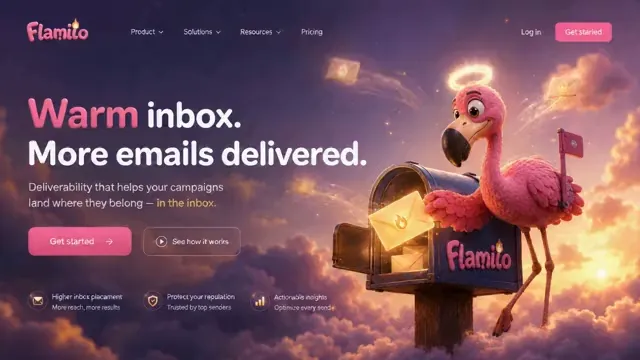
![Flamito hero poster frame: a pink flamingo with a halo putting a letter into a mailbox, headline Warm inbox. More emails delivered.](https://monstric.com/site-loops/flamito-poster.webp)
*The Flamito poster. This 25 KB WebP is what a visitor on a slow connection sees first, and what LCP measures.*

## The pattern we ship

Here’s the approach on monstric.com, simplified. The poster is a plain `<img>` that paints with the HTML. The `<video>` is only mounted after the window’s `load` event, so it never competes with fonts or the hero image for bandwidth. When the video actually starts playing, it fades in on top of the poster.

HTML

```
<div class="hero-media">
  <img src="/hero-poster.webp" width="640" height="360"
       alt="Product hero" fetchpriority="high">
  <!-- video is injected after window load, see script -->
  <button class="hero-toggle" aria-label="Pause animation" hidden>Pause</button>
</div>
```

JavaScript

```
const box = document.querySelector(".hero-media");
const toggle = box.querySelector(".hero-toggle");

function startLoop() {
  const conn = navigator.connection;
  if (conn?.saveData || /2g$/.test(conn?.effectiveType ?? "")) return;
  if (matchMedia("(prefers-reduced-motion: reduce)").matches) return;

  const v = document.createElement("video");
  Object.assign(v, { src: "/hero.mp4", loop: true, playsInline: true });
  v.muted = true; // set the property, not just the attribute
  v.setAttribute("aria-hidden", "true");
  v.addEventListener("playing", () => {
    v.classList.add("is-on");
    toggle.hidden = false;
  }, { once: true });
  box.prepend(v);
  v.play().catch(() => {});

  toggle.onclick = () => {
    const paused = v.paused;
    paused ? v.play() : v.pause();
    toggle.textContent = paused ? "Pause" : "Play";
    toggle.setAttribute("aria-label", paused ? "Pause animation" : "Play animation");
  };
}

document.readyState === "complete"
  ? startLoop()
  : addEventListener("load", startLoop, { once: true });
```

CSS

```
.hero-media { position: relative; aspect-ratio: 16 / 9; }
.hero-media img, .hero-media video {
  position: absolute; inset: 0; width: 100%; height: 100%; object-fit: cover;
}
.hero-media video { opacity: 0; transition: opacity .3s; }
.hero-media video.is-on { opacity: 1; }
```

A few things in there deserve a sentence each.

### Muted, for real

Chrome’s policy is short: muted autoplay is always allowed.[5] MDN says the same for other browsers, and notes that blocking doesn’t apply to video with no audio track at all.[6] So export your loop without audio. In React we also set `el.muted = true` through a ref, because the `muted` attribute has a long history of going missing from server rendered HTML, and iOS won’t autoplay a video it thinks has sound. We found that one the boring way.

### Don’t lazy-load the thing above the fold

MDN now documents `loading="lazy"` on video, which holds off the download and autoplay until the element is near the viewport.[7] That’s great for loops further down the page, like the ones in this article. For the hero it’s backwards. The 2024 Web Almanac calls lazy-loading the LCP element an anti-pattern.[8] Keep the poster eager and give it explicit width and height so nothing jumps.

### Respect the people who asked for less motion

`prefers-reduced-motion` has been supported in every major browser since January 2020.[9] MDN puts the reason plainly: these animations *“can trigger discomfort for those with vestibular motion disorders.”* If the media query matches, don’t start the loop. The poster alone is a perfectly good hero.

### Give people a pause button

WCAG 2.2 criterion 2.2.2, Pause, Stop, Hide, is Level A, the most basic level. It applies to moving content that starts on its own, lasts more than five seconds and sits next to other content.[10] A loop that repeats forever ticks all three boxes. Apple’s homepage, for what it’s worth, ships a visible play/pause button on its hero animation and hides the video itself from screen readers with `aria-hidden`.[11]

Honest footnote

Our own homepage showcase handles the poster, Save-Data and the load timing, but it doesn’t have a pause control yet. Writing this article is how I noticed. It’s on the list.

## A checklist you can paste into a ticket

1. MP4 (H.264), no audio track, 4 to 6 seconds, loops cleanly on the last frame.
2. Keep it small in pixels. 640 × 360 is plenty for a card, 1280 × 720 for a full-width hero.
3. One moving subject. Static camera. Aim for under 200 KB.
4. WebP poster from the first frame, explicit width and height, eager, high fetch priority.
5. Mount or start the video after `load`. Skip it on Save-Data and 2G.
6. No autoplay when `prefers-reduced-motion: reduce` matches.
7. A visible pause button once it’s playing. Decorative video gets `aria-hidden`.
8. Lazy-load only the loops below the fold.

## Where the loops come from

For context, since people ask: these heroes started as still mockups that Monstric generated as part of a brand, and were then animated from the still image. The still came first, which is why the poster matches the first frame perfectly. If you’re making your own, that order helps. Design the frame you’d be happy with if the video never played, then decide what moves. If you build with Claude Code, put that look in [brand files the agent reads](https://monstric.com/blog/give-claude-code-a-brand), so the hero doesn’t end up as one of the [same-looking AI-generated pages](https://monstric.com/blog/why-claude-code-websites-look-the-same).

Because for a lot of your visitors, it won’t play. Their phone is in low power mode, they asked for reduced motion, or they scrolled past before it loaded. The poster is the hero. The loop is the bonus.

## Sources

1. [Replace animated GIFs with video for faster page loads](https://web.dev/articles/replace-gifs-with-videos), web.dev (Houssein Djirdeh, Jeremy Wagner)
2. [Largest Contentful Paint (LCP)](https://web.dev/articles/lcp), web.dev, updated 4 Sep 2025
3. [Web Almanac 2025, Performance](https://almanac.httparchive.org/en/2025/performance), HTTP Archive
4. [LCP changes in Chrome 116 (video first frame)](https://chromium.googlesource.com/chromium/src/+/refs/heads/main/docs/speed/metrics_changelog/2023_08_lcp.md), Chromium metrics changelog
5. [Autoplay policy in Chrome](https://developer.chrome.com/blog/autoplay), Chrome for Developers (Francois Beaufort)
6. [Autoplay guide for media and Web Audio APIs](https://developer.mozilla.org/en-US/docs/Web/Media/Guides/Autoplay), MDN
7. [<video>: The Video Embed element](https://developer.mozilla.org/en-US/docs/Web/HTML/Element/video), MDN
8. [Web Almanac 2024, Media](https://almanac.httparchive.org/en/2024/media), HTTP Archive (Stefan Judis, Eric Portis)
9. [prefers-reduced-motion](https://developer.mozilla.org/en-US/docs/Web/CSS/@media/prefers-reduced-motion), MDN
10. [Understanding SC 2.2.2: Pause, Stop, Hide](https://www.w3.org/WAI/WCAG22/Understanding/pause-stop-hide.html), W3C WAI, WCAG 2.2
11. [apple.com homepage source, viewed 10 Nov 2026](https://www.apple.com/), Apple

File sizes measured on the files served from monstric.com on 10 Nov 2026. Want heroes like these made for your own brand inside Claude Code? That’s what [Monstric](https://monstric.com/studio) does. See the [examples](https://monstric.com/examples) or read the [FAQ](https://monstric.com/faq).
